How to Identify Trust Funds
There may be times when you want to empty out an unused local fund, but you need to know first if its balance includes any “trust funds.” Or it’s the end of the year and you are getting ready to reclaim some excess Church Budget allocation balances, but you know you should confirm that everything you plan to transfer is trust-fund free.
So how do you know? If you can compare two numbers, you can do this! Read through this whole info sheet and illustrations until you understand the principles. Then follow the instructions to identify your own trust funds.
- From Jewel home page, click on “Reports and Graphs,” then “Financial Summary.”
- At the top of the Financial Summary, change the date range to “All” (very important!) and then click on “Detail.”
- Print out that Financial Summary, then find a ruler or straight-edge of some sort and 3 colors of pens or pencils. You might choose black, red and green, but other colors would work just as well.
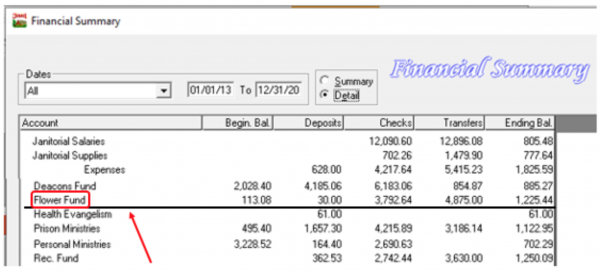
- Pick a local fund. Draw a black line under it all the way across. For our example, we'll start with the “Flower Fund.”
- Add together the “Beginning Balance” column and the “Deposits” column, using $0 if either is blank. This tells us how much has been donated to this local fund over the years. These Donated funds are called “Trust Funds.” Let's say we have a beginning balance of $113.08 and deposits of $30.00, for a total Trust Fund amount of $143.08.
- Compare the total Trust Funds to the balance in the “Checks” column. The Checks column tells us how much has been spent from the flower fund during that same time period.
- So we have $143.08 that was donated,
- And $3,792.64 that was spent.
- The rule is, If more has been spent then was donated, then the donated funds are all spent and whatever is left in the “Ending Balance” column is NOT Trust Funds.
- So, I circle that Ending Balance in green on my financial summary, so I know that the entire amount is safe money, not restricted in how it can be used.

Let’s try “Personal Ministries,” in the same illustration above.
- Start with drawing the line all the way across.
- Add the “Beginning Balance” and the “Deposits” column balances together. Let's say we end up with $3,392.92.
- Compare it to the balance in the “Checks” column, which is $2,690.63.
- And we see that what has been spent is less than what was donated, so that tells us that there are still Trust Funds left in Personal Ministries.
- The difference between the two is $702.29, which is exactly the Ending Balance. So, I circle the Ending Balance in red on my financial summary, so I know that we cannot use those funds for anything else.
Do you see how it works? You can use this method to quickly check any local fund in question during a board meeting, or you can check all of the local funds on the financial summary at the end of the year, to find out how much Church Budget money is hiding out in them, left over at year’s end.
The principle is the same even if some of the columns are empty.
For example: Janitorial Supplies in the illustration above. No Beginning Balance. No Deposits, which means no Trust Funds. So, the Ending Balance all came from Church Budget and could be transferred back to church budget if the board wished.
Health Evangelism. There is a donation for $61 but nothing has been spent. The $61 is still there and it is all Trust Funds.
Sometimes it is a bit more complicated. Like when part of the Ending Balance is Trust Funds but not all of it. Like the “Deacon’s Fund”.
- The total of the Beginning balance and Deposit column donations is $6,213.46.
- Compare it to the balance in the “Checks” column, which tells us what has been spent, which is $6,183.06. Obviously, there are still Trust Funds that have not been spent.
- If we subtract, we see that there are $30.40 left of Trust Funds, but there is $885.27 left in the Ending Balance column. So we have $854.87 of Church Budget funds in the Ending Balance as well.
- If we wanted to transfer the church budget portion of that local fund back into Church Budget, we could. But we would need to leave the $30.40 in there to be spent on Deacon Fund things, whatever those happen to be.
- So, we circle it in red and write $30.40 next to it.
Let us say here, just for clarity, it is not wrong to carry a Church Budget balance in a fund. A Local Fund such as Property and Liability Insurance needs to be accumulating all year to pay the annual bill. A Capital Maintenance Fund usually needs to be built up over many years.
But at the end of the year, in general, it is good church finance to reclaim excess Church Budget funds. And especially if your church is facing an unexpected financial need, knowing how to identify non-trust funds can be very, very useful.
Click here for more topics related to Fund Handling Legalities